Chapter 23 — Add-ons: Anything Can Be Sold
Attend onboarding guide · ~7 min read · ↑ Back to contents
You've met add-ons in passing — parking in Chapter 12, the "forced addon total" inside the inventory snapshot in Chapter 18. This chapter gives them their proper introduction — the model, the three types, and the overflow special case.
An add-on is anything extra
The definition really is that loose: an add-on is anything the team wants a fan to be able to buy alongside the main purchase. Parking. A food & beverage upgrade. Merchandise. And remember the rule from Chapter 6 — everything is an event — so add-ons are sold as separate events on the vendor, just like seats.
How loose? A university client launched a store where the product being sold is tents — party tents outside the stadium — and the game tickets were the add-ons. The whole model, inverted, with zero special-casing:
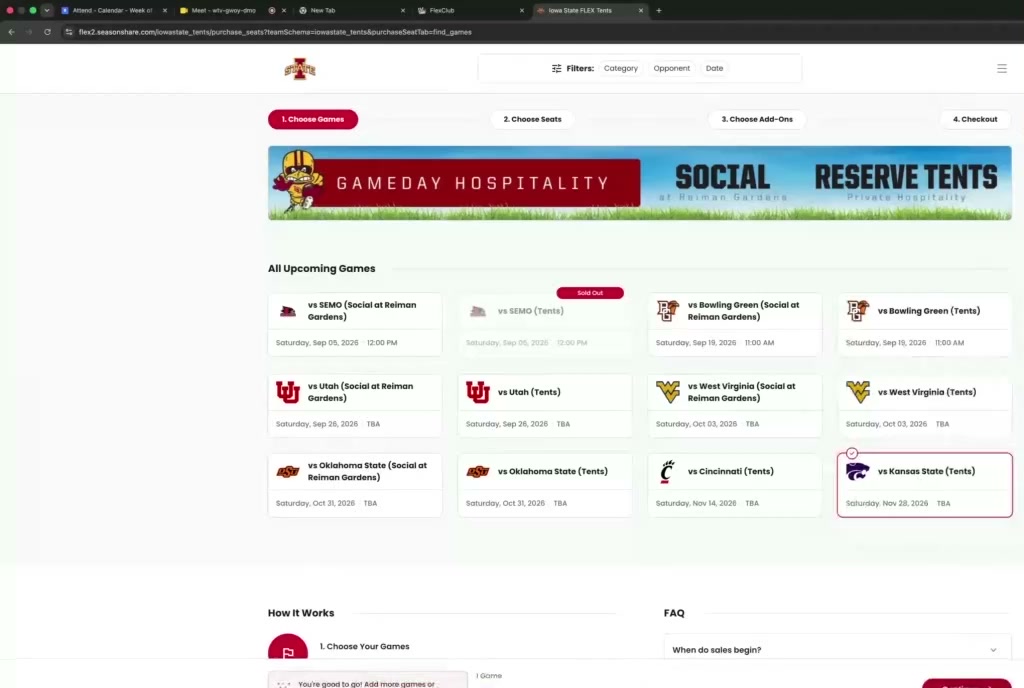
The tents store: same stepper, same machinery — the "venue" is a row of tents, and game tickets are the add-on. Anything can be the product; anything can be the add-on.
The three types
| Type | Fan's choice? | Transacted? | Shown price? |
|---|---|---|---|
| Optional | yes — pick it on the add-ons page | yes | yes |
| Forced | no — comes with the purchase | yes — as a separate event | no — built into the displayed price |
| Informational | no | no | no — "it's included" |
Optional add-ons are the familiar kind: after seats, the fan gets an add-ons page — upgrade the suite menu (dessert platter, beers and wines), buy merchandise, add extra seats.
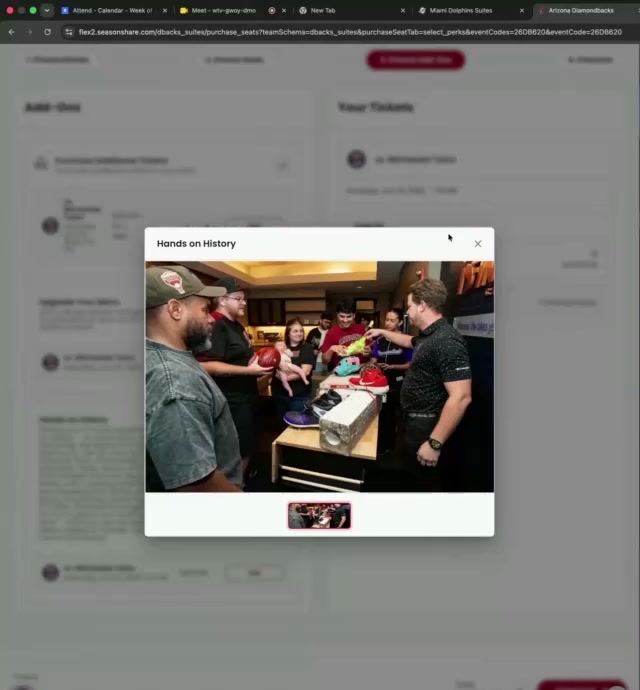
An optional add-on ("Hands on History" — a merch experience) on the add-ons step. Take it or leave it.
Forced add-ons are the team saying: if you buy this suite, these come with it — period. The fan isn't asked, and isn't even shown the breakdown. The suite displays one price; under the hood, part of that money is transacted as separate events.
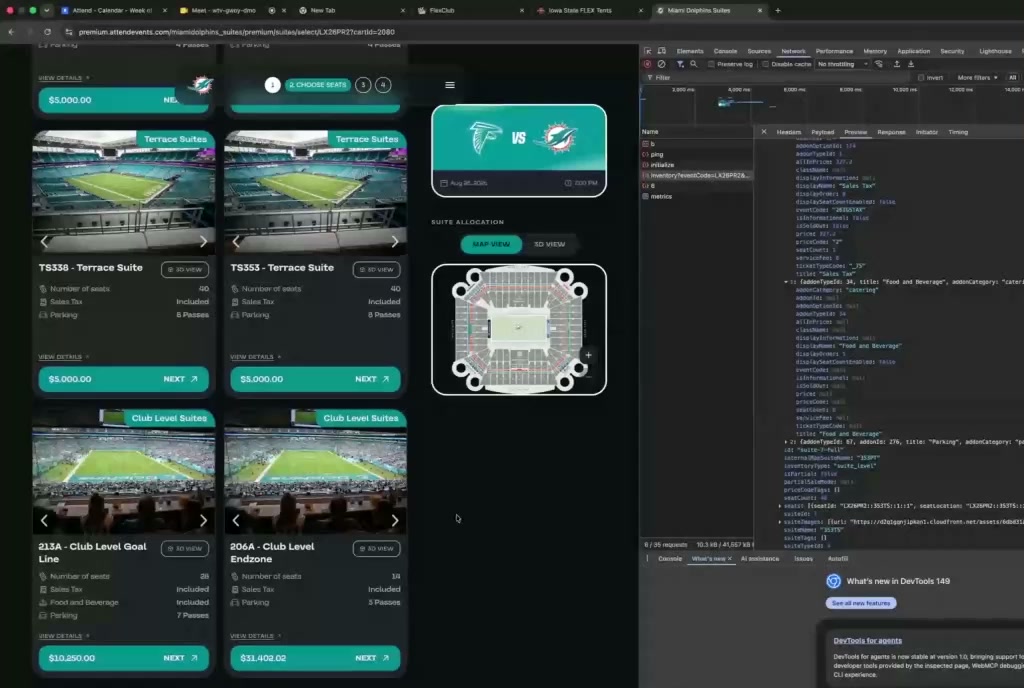
Forced add-ons in the wild: the Terrace Suite says $5,000 — sales tax included, 8 parking passes. The API tells the truth: the suite is $4,672, and "Sales Tax" is a separate $327 event forced into the purchase.
Why would sales tax be an event? Because the team's books want it billed separately, but the fan should just see "$5,000, tax included." Forced add-ons square that circle.
⚠️ Status — testing on Flex: forced add-ons are designed primarily for Premium suites. On the Flex product, add-on support (especially the frontend) is still maturing — when setting up a Flex sandbox, prefer optional add-ons. The backend is functional either way.
Informational add-ons are forced add-ons with the transaction removed: nothing is bought, the fan is simply told it's included — "comes with 8 parking passes." Pure display.
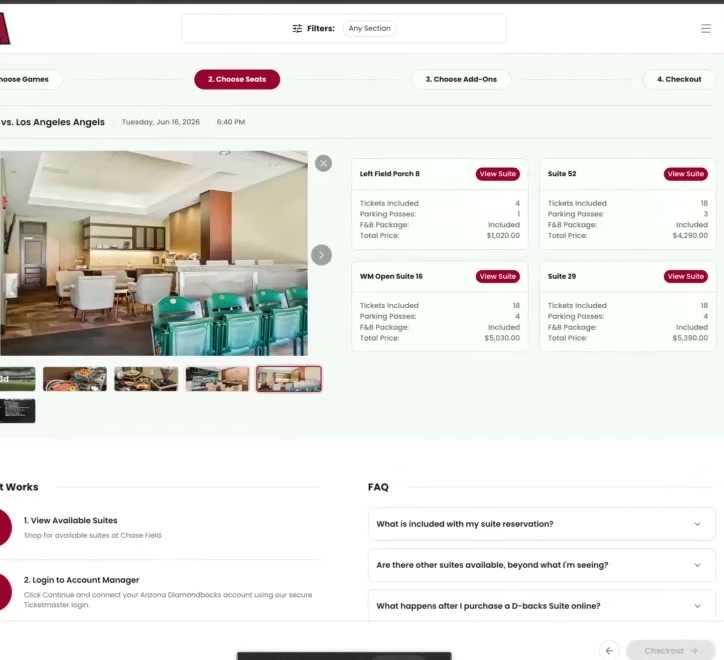
Informational add-ons in the wild: every suite card promises parking passes and an F&B package — nothing extra is transacted; it's display data per suite.
Why would a team keep parking informational when fans clearly need it? For big suite purchases, a representative calls the buyer afterwards and personally sorts the parking (luxury lot for a returning client, early access, etc.). The store just announces the pass count; humans handle the rest.
🧠 Who decides which forced add-ons you get? The backend — never the frontend. Two reasons: the retry ladder can swap your suite mid-request (a frontend-chosen add-on could belong to the old suite), and a thing the fan has no say in shouldn't depend on the fan's client. In V2, perks were a post-checkout "quick hack" that occasionally got skipped; V3 resolves forced add-ons server-side inside manage cart — and if a forced add-on's hold fails, the whole event is rolled back on the spot.
⚠️ The same item can be a different type in different stores. Parking is a forced add-on for one product and an informational one for another. The type is a per-store configuration choice, not a property of the item.
Overflow: the fourth kind
One special case got its own table in Chapter 11's suite world: overflow add-ons — extra seats beyond the suite's fixed capacity. Picture a suite with ~15 permanent seats at the front, and room at the back where staff can add tables and chairs — "up to 4 extra seats for $275 each." Those temporary seats are the overflow.
Mechanically they're the one add-on that can't use best-available holds: the extra seats are
specific physical locations, mapped one row per seat in tbl_suite_overflow_seat_mapping (the
sibling of the suite seat mapping). When a fan adds N overflow seats, the backend takes the first
N mapped seats and holds them seat-specifically.
Don't confuse overflow with partial suites (Chapter 19): partial = selling one real suite to several parties (a Live Nation specialty — their "suites" are open boxes and tables, not closed rooms). Overflow = adding capacity beyond the suite's fixed seats, sold to the same buyer.
Where add-ons hit the money
Recall from Chapter 18: the inventory snapshot stores a forcedAddonTotal and a grandTotal per
suite offering. That's forced add-ons showing up in the "from" price on the home page — the fan-facing
number already includes them. Optional add-ons, by contrast, only enter the total when the fan picks
them in the cart.
Recap
- An add-on is anything extra — and since everything is an event, add-ons are separate events on the vendor. (A client sells tents with game tickets as the add-ons.)
- Three types: optional (fan chooses), forced (no choice, transacted separately, price baked into the displayed total), informational (forced, but nothing transacted — display only).
- The same item (e.g. parking) can be forced in one store and informational in another.
- Overflow add-ons sell extra seats beyond a suite from a dedicated seat pool — see How to configure an overflow add-on and the Add-on Types reference.
- Forced add-ons are why the snapshot's
grandTotal≠ suite price: the home-page number already includes them.
← Back to contents · Next → Chapter 24: Inside the Cart
Quick reference: the type matrix, enums, and overflow requirements are in Add-on Types — Reference.