Chapter 16 — Programs in Practice: One Active, Many Published
Attend onboarding guide · ~7 min read · ↑ Back to contents
Welcome to Part 4. Parts 1–3 built the mental model — the business, the ticketing machinery, and how a Flex program is configured. Part 4 goes one floor down: how that model is actually built in the Flex v3 backend. It's more technical than the earlier parts (you'll see real tables and API calls), but every piece hangs off concepts you already know.
🧭 One structural rule before you dive in: the backend follows a strict controller → service → repository layering (raw SQL only in repositories; cross-module calls go service-to-service). The full convention — and the multi-tenancy rules that ride alongside it — is in Write schema-safe backend code.
We start where Part 3 left off — the flex program — because the backend adds two ideas that change how you think about it.
A quick recap, then the twist
From Chapter 12: a flex program is the top-level thing a team configures — its shape is Build Your Own, Game Packs, or (later) Predefined Packages. The backend adds:
- A program is created per store (per client × product schema) when the product launches.
- A store can have many published programs, but exactly one active at a time.
"Published" means ready to go. Only the active one drives the store right now — it decides the inventory type, the pricing, the class names, and whether fans see BYO, game packs, or preset packs.
The full lifecycle is draft → published → archived, with active as a separate switch on top. Why both? Published is a signal to teammates — "this program is configured, tested, safe to activate" — and Cortex enforces it with stage-by-stage publish checks (it warns, say, that some suites are missing pricing before letting you publish). Active is simply which published program is live. And switching carries no transactional risk: purchases — even one mid-checkout — are vendor transactions that a program swap can't touch (Chapter 22 explains why).
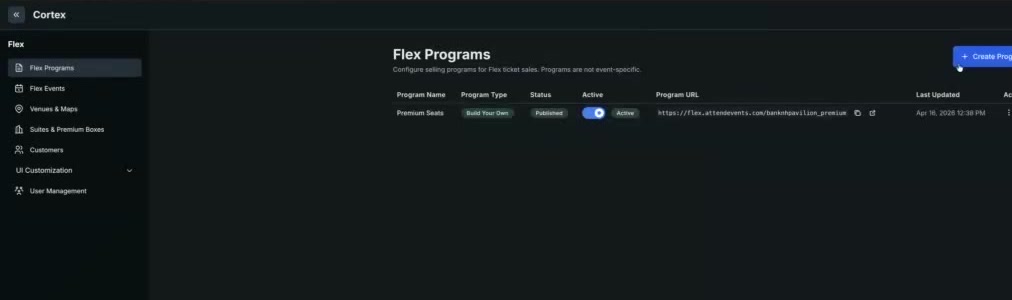
Programs in Cortex: a published Build Your Own program toggled Active, with Create Program to prepare another. Swapping which one is active is how a team changes its whole offer.
The twist: programs are swappable
This is the big new idea. Because a store can hold several ready programs and flip which one is active, a team changes its whole offer by switching programs — no code, no migration.
Picture a Black Friday sale. The old way was painful:
- An engineer goes into the system and edits the pricing, and
- a frontend dev adds a "SALE" banner — then both get reverted when the sale ends.
The new way:
The regular program keeps running. The team pre-configures a second program with the sale pricing and its own banner. When the sale starts, they switch the active program to it; when it ends, they switch back. Nothing is hand-edited under pressure.
The same trick handles drift over a season. Say a team launched a 10-game pack, but by mid-season only 7 games remain — they spin up a fresh program with better-suited packs and pricing and switch to it.
Example: the Warriors run their normal BYO program all season. For Black Friday they prepare a second program — same games, 25% off, a holiday banner — and flip to it for the weekend. Monday morning, one click puts the regular program back.
What lives outside the program (and why)
If switching programs meant rebuilding everything, it would be useless. So three things are not program-scoped — they live at the store level and persist across every program swap:
Events, venues, and suites stay put; pricing, packs, and presentation change per program. The reasoning is practical: a team defines 50 events and a stack of suites once — forcing them to redo all of that for every new program (a flash sale, a playoff pack) would be hours of duplicated work each time. Pricing is the thing that actually varies, so that's what a program owns.
What a program does own (lightly)
You'll meet these in the code as the program's configuration:
- Inventory type — is this program selling at seat level or suite level?
- Class names — which access groups (Chapter 7) this program may sell.
- Pack structure — for game packs, the shape Cortex should render (packs, tiers, or both — see Chapter 12).
Don't memorize the tables yet; just hold the shape: one active program points at the pricing, packs, and class names in force right now, while events/venues/suites sit underneath, unchanged.
Recap
- A flex program is created per store; a store can have many published programs but only one active.
- Programs are swappable — teams change their whole offer (flash sales, mid-season packs) by switching the active program, not by hand-editing pricing and banners.
- Events, venues, and suites live outside the program so they survive swaps; pricing, packs, and presentation are what a program owns.
Next → Chapter 17 — Building Inventory: From Vendor API to Tables