Chapter 19 — Suites, Continued: Types & Partial Sales
Attend onboarding guide · ~6 min read · ↑ Back to contents
Chapter 11 covered the core of suites — real seats sold as one block. Two follow-on features build on it: how suites are grouped (suite types) and how they can be split (partial sales).
Suite types: a category above suites
A suite type is a thin grouping that sits above suites — "Club Level Suites," "Mezzanine Suites,"
"Away Suites." Under the hood it's almost nothing: just a title and a description, plus a
suite_type_id added onto each suite.
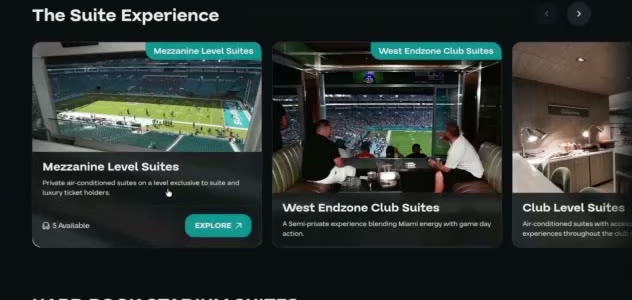
Suite types in the Premium store — Mezzanine, West Endzone Club, Club Level — each a category fans can browse and filter by. Miami Dolphins.
It was built for the Premium UI, and its one real job is letting fans filter by suite type. (Recall from Chapter 11 that suite types also cascade images — set the artwork once on the type, and its suites inherit it.) Plain Flex doesn't use suite types — they only matter where suites are the whole product (Premium).
Partial suites: selling part of a box
By default a suite is all-or-nothing (Chapter 11). But some clients — Live Nation especially — want to sell a part of a suite. That's the partial sale feature, controlled by two settings:
allowPartialSale— may this suite be split at all?partialSaleMode— how it's split:- count-based (the mode Cortex supports) — you define allowed sizes, e.g. 2 / 4 / 6, and the store offers sub-suites of those sizes.
- block-based (defined but effectively unused) — you define explicit blocks of specific seats. It gives finer control over which seats sell, but it's "too much work" and rarely worth it.
One constraint on count-based partials: the seats offered must be consecutive, within a single
row — never scattered, never spanning rows. The backend finds them with a sliding-window search
(findFirstConsecutiveBlock). Algorithms like this are exactly why the inventory snapshot
(Chapter 18) exists — too expensive to run per request.
There's one counter-intuitive rule worth burning in:
⚠️ When partial sale is on, the full suite disappears. If a 10-seat suite is set to partials of 5, fans only ever see the 5. To also sell the whole thing, the team must add a partial equal to the full size — e.g. a partial of 10 for a 10-seat suite.
Example: a Live Nation venue has a 12-seat suite and turns on count-based partials of 2, 4, 6. Fans can now buy a 2-, 4-, or 6-seat slice. The 12-seater itself won't appear unless the team also adds a partial of 12.
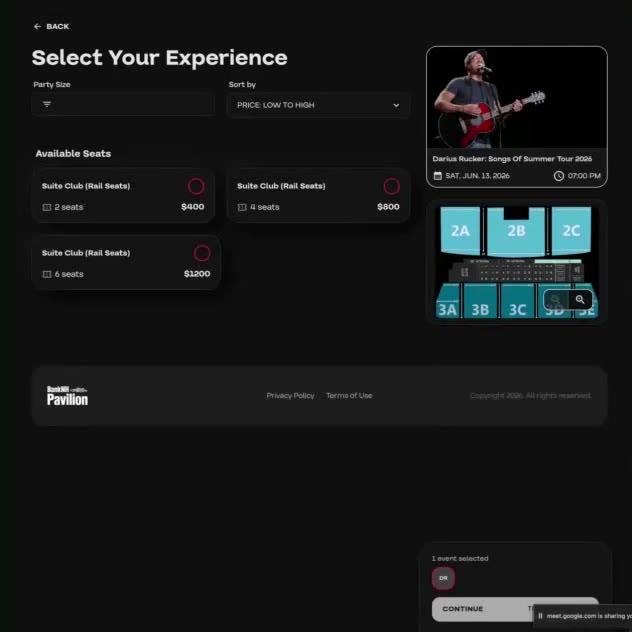
Count-based partial sales in the Flex store: the same Suite Club sold as 2 / 4 / 6 seats ($400 / $800 / $1,200). BankNH Pavilion — a Live Nation venue.
A note on display names (and Tickets.com)
Suites and sections also carry display names — what the fan actually reads. For Ticketmaster
the raw section name is the display name, so there's little to do. But Tickets.com is different:
its section names are really IDs, so Attend has to extract a readable name for them. That's the
job of the section-mapping layer. Custom display names (e.g. turning 102 WC into 102 Wheelchair)
are planned but not in Cortex yet.
Recap
- A suite type is a light category above suites (title + description, a
suite_type_idon each suite); built for Premium, its main job is filtering, and it cascades images. - Partial sales let a suite be split: count-based (define sizes like 2/4/6 — the supported mode) or block-based (explicit seat blocks — defined but unused).
- When partials are on, the full suite is hidden unless a partial equal to the full size is added.
- Suites/sections carry display names; Tickets.com section names are IDs that must be mapped to readable names.